
| 일 | 월 | 화 | 수 | 목 | 금 | 토 |
|---|---|---|---|---|---|---|
| 1 | 2 | 3 | 4 | 5 | 6 | |
| 7 | 8 | 9 | 10 | 11 | 12 | 13 |
| 14 | 15 | 16 | 17 | 18 | 19 | 20 |
| 21 | 22 | 23 | 24 | 25 | 26 | 27 |
| 28 | 29 | 30 |
- 비개인화추천모델
- spring unit test
- 분산파일시스템
- 스프링단위테스트방법
- jsp permission denied
- dial timeout
- staem algorithm
- 존폴결혼반지
- 존폴결혼예물
- jqxWidget워터마크
- Akamai 연구결과
- 한글 특수문자 자바스크립트
- tomcat튜닝
- jqx워터마크제거
- LLM기반CBF
- 존폴쥬얼리
- set-cookie 안만들어짐
- 분산파일
- dialtimeout
- 외부 톰캣 특수문자 깨질 때
- integrationtest
- 자바스크립트 깨질 때
- 추천시스템steam
- cookie refreshToke
- 스팀 게임 스코어 알고리즘
- 존폴반지
- steam game score
- jsp 예외 permission
- 동시 요청 처리
- LLM기반 콘텐츠 추천
- Today
- Total
hola 개발
[ MSA ] ActiveMQ를 이용한 비동기처리 맛보기 본문
[ 왜 이걸 하는거지? ]
MSA를 공부하면서 자연스럽게 메세지 아키텍쳐를 배우게 되었습니다. 어떻게 메세지 아키텍쳐를 통해 비동기처리를 하는지 배우고자 오늘 작업을 실시하였습니다.
[ 다양한 MQ 중 왜 ActiveMQ를 선택했나? ]
다양한 MQ가 있지만, 현재 공부하는 단계이며, 빠르게 비동기 매커니즘을 이해하기 위해 또한 현재 컴퓨터 환경에서는 Git에 접속 할 수 없어 다른 MQ를 설치하지 못하기에 ActiveMQ를 선택하였습니다.
[ 버전 및 환경 ]
- 자바 17
- 스프링부트 3.4.3
- ActiveMQ 5.19.0
- maven project
[ 프로젝트 설명 ]
2초마다 생산자는 메세지를 만들어서 메세지 브로커에 전달해줍니다.
1초마다 소비자는 메세지 브로커에 있는 메세지를 가져옵니다.
생산자는 메세지를 메세지 브로커에 전달, 소비자는 메세지 브로커에서 메세지를 가져오도록 각각 따로 따로 작업을 진행합니다. 즉, 생산자와 소비자는 비동기로 작업을 실시합니다.
만약 동기 작업이였다면 생산자가 메세지를 만들면 소비자가 메세지를 받은 것을 확인하고 나서 다시 또 생산자는 메세지를 만들어야 했을 것입니다.
프로젝트는 maven project로 진행합니다.
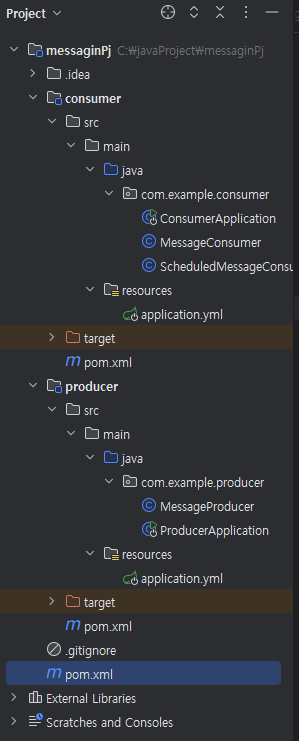
프로젝트 구조는 부모 pom.xml에 하위 모듈로 consumer와 producer를 만들고 각각 스프링부트로 실행할 것입니다.
부모 pom.xml은 공통으로 쓰이는 라이브러리 버전을 관리할 것입니다.
[ 코드 ]
- 프로젝트 구조 사진
- 부모 pom.xml
<project xmlns="http://maven.apache.org/POM/4.0.0"
         xmlns:xsi="http://www.w3.org/2001/XMLSchema-instance"
         xsi:schemaLocation="http://maven.apache.org/POM/4.0.0 http://maven.apache.org/xsd/maven-4.0.0.xsd">
    <modelVersion>4.0.0</modelVersion>

    <groupId>test</groupId>
    <artifactId>messagePj</artifactId>
    <version>1.0-SNAPSHOT</version>
    <packaging>pom</packaging>

    <modules>
        <module>producer</module>
        <module>consumer</module>
    </modules>

    <dependencyManagement>
        <dependencies>

            <dependency>
                <groupId>org.springframework.boot</groupId>
                <artifactId>spring-boot-starter</artifactId>
                <version>3.4.3</version>
            </dependency>

            <dependency>
                <groupId>org.apache.activemq</groupId>
                <artifactId>activemq-spring</artifactId>
                <version>5.19.0</version> <!-- Correct ActiveMQ version -->
            </dependency>

            <dependency>
                <groupId>javax.jms</groupId>
                <artifactId>javax.jms-api</artifactId>
                <version>2.0.1</version>
            </dependency>


        </dependencies>
    </dependencyManagement>

    <build>
        <pluginManagement>
            <plugins>
                <plugin>
                    <groupId>org.springframework.boot</groupId>
                    <artifactId>spring-boot-maven-plugin</artifactId>
                </plugin>
            </plugins>
        </pluginManagement>
    </build>
</project>
-producer pom.xml
<project xmlns="http://maven.apache.org/POM/4.0.0"
         xmlns:xsi="http://www.w3.org/2001/XMLSchema-instance"
         xsi:schemaLocation="http://maven.apache.org/POM/4.0.0 http://maven.apache.org/xsd/maven-4.0.0.xsd">
    <modelVersion>4.0.0</modelVersion>

    <parent>
        <groupId>test</groupId>
        <artifactId>messagePj</artifactId>
        <version>1.0-SNAPSHOT</version>
        <relativePath>../pom.xml</relativePath>
    </parent>

    <artifactId>producer</artifactId>

    <dependencies>

        <dependency>
            <groupId>org.springframework.boot</groupId>
            <artifactId>spring-boot-starter</artifactId>
        </dependency>

        <dependency>
            <groupId>org.apache.activemq</groupId>
            <artifactId>activemq-spring</artifactId>
        </dependency>

        <dependency>
            <groupId>javax.jms</groupId>
            <artifactId>javax.jms-api</artifactId>
        </dependency>

    </dependencies>
</project>
- consumer pom.xml
<project xmlns="http://maven.apache.org/POM/4.0.0"
         xmlns:xsi="http://www.w3.org/2001/XMLSchema-instance"
         xsi:schemaLocation="http://maven.apache.org/POM/4.0.0 http://maven.apache.org/xsd/maven-4.0.0.xsd">
    <modelVersion>4.0.0</modelVersion>

    <parent>
        <groupId>test</groupId>
        <artifactId>messagePj</artifactId>
        <version>1.0-SNAPSHOT</version>
        <relativePath>../pom.xml</relativePath>
    </parent>

    <artifactId>consumer</artifactId>

    <dependencies>
        <dependency>
            <groupId>org.springframework.boot</groupId>
            <artifactId>spring-boot-starter</artifactId>
        </dependency>

        <dependency>
            <groupId>org.apache.activemq</groupId>
            <artifactId>activemq-spring</artifactId>
        </dependency>

        <dependency>
            <groupId>javax.jms</groupId>
            <artifactId>javax.jms-api</artifactId>
        </dependency>
    </dependencies>
</project>
- producer application.yml
spring:
  activemq:
    broker-url: tcp://localhost:61616 // ActiveMQ 메세지 브로커 서버 포트
    user: admin // ActiveMQ 웹 관리 콘솔 아이디
    password: admin // ActiveMQ 웹 관리 콘솔 비밀번호

activemq:
  queue:
    name: testQueue

server:
  port: 8081
- consumer application.yml
spring:
  activemq:
    broker-url: tcp://localhost:61616 // ActiveMQ 메세지 브로커 서버 포트
    user: admin // ActiveMQ 웹 관리 콘솔 아이디
    password: admin // ActiveMQ 웹 관리 콘솔 비밀번호

activemq:
  queue:
    name: testQueue

server:
  port: 8080
- producer 자바 코드
MessageProducer 와 ProducerApplication이 있습니다. 설명은 코드 안에 주석으로 달아놨으니 읽어보시면 되겠습니다.
package com.example.producer;

import org.apache.activemq.ActiveMQConnectionFactory;
import org.springframework.scheduling.annotation.Scheduled;
import org.springframework.stereotype.Component;

import javax.jms.*;

@Component
public class MessageProducer {
    private final ConnectionFactory connectionFactory;
    private final String queueName = "testQueue";

    public MessageProducer() {
        // ActiveMQConnectionFactory는 ActiveMQ 브로커와 연결
        this.connectionFactory = new ActiveMQConnectionFactory("tcp://localhost:61616");
    }

    @Scheduled(fixedRate = 2000)
    public void sendMessage(){
        // ActiveMQConnectionFactory는 createContext로 JMSContext 객체를 생성

        /** JMSContext의 특징
         * JMSContext 연결과 세션을 하나로 묶은 객체임
         * 연결 및 세션 관리, 소비자 또는 생산자 생성하여 메세지 송수신 가능
         * 메세지 처리 중 발생하는 오류를 처리할 수 있도록 트랜잭션 가능
         * AutoCloseable 인터페스를 구현하여 try-with-resources문에서 자동으로 리소스 해제 가능
         * */
        try(JMSContext context = connectionFactory.createContext()){
            Queue queue = context.createQueue(queueName);

            String messageContent =  "만든 시간 : " + System.currentTimeMillis() + " producer가 보낸 메세지입니다.";
            TextMessage message = context.createTextMessage(messageContent);

            JMSProducer producer = context.createProducer();

            producer.send(queue,message);
            System.out.println("ActiveMQ로 메세지 전송: " + messageContent);
        }
    }
}
package com.example.producer;

import org.springframework.boot.SpringApplication;
import org.springframework.boot.autoconfigure.SpringBootApplication;
import org.springframework.scheduling.annotation.EnableScheduling;

@EnableScheduling
@SpringBootApplication
public class ProducerApplication {
    public static void main(String[] args) {
        SpringApplication.run(ProducerApplication.class,args);
    }
}
- consumer 자바 코드
MessageConsumer ScheduledMessageConsumer ConsumerApplication 이 있습니다.
package com.example.consumer;

import org.apache.activemq.ActiveMQConnectionFactory;
import org.springframework.stereotype.Component;

import javax.jms.*;

@Component
public class MessageConsumer {
    private final ConnectionFactory connectionFactory;
    private final String queueName = "testQueue";

    public MessageConsumer() {
        this.connectionFactory = new ActiveMQConnectionFactory("tcp://localhost:61616");
    }

    public void receiveMessage() {
        try (JMSContext context = connectionFactory.createContext()) {
            Queue queue = context.createQueue(queueName);

            JMSConsumer consumer = context.createConsumer(queue);

            Message message = consumer.receive(1000);

            if (message instanceof TextMessage) {
                String receivedMessage = ((TextMessage) message).getText();
                System.out.println("받은 메세지 : " + receivedMessage);
            } else {
                System.out.println("텍스트 형태의 메세지가 아닙니다. ");
            }
        } catch (JMSException e) {
            e.printStackTrace();
        }
    }
}
package com.example.consumer;

import org.apache.activemq.ActiveMQConnectionFactory;
import org.springframework.stereotype.Component;

import javax.jms.*;

@Component
public class MessageConsumer {
    private final ConnectionFactory connectionFactory;
    private final String queueName = "testQueue";

    public MessageConsumer() {
        this.connectionFactory = new ActiveMQConnectionFactory("tcp://localhost:61616");
    }

    public void receiveMessage() {
        try (JMSContext context = connectionFactory.createContext()) {
            Queue queue = context.createQueue(queueName);

            JMSConsumer consumer = context.createConsumer(queue);

            Message message = consumer.receive(1000);

            if (message instanceof TextMessage) {
                String receivedMessage = ((TextMessage) message).getText();
                System.out.println("받은 메세지 : " + receivedMessage);
            } else {
                System.out.println("텍스트 형태의 메세지가 아닙니다. ");
            }
        } catch (JMSException e) {
            e.printStackTrace();
        }
    }
}
package com.example.consumer;

import org.springframework.boot.SpringApplication;
import org.springframework.boot.autoconfigure.SpringBootApplication;
import org.springframework.scheduling.annotation.EnableScheduling;

@EnableScheduling
@SpringBootApplication
public class ConsumerApplication {
    public static void main(String[] args) throws Exception {
        SpringApplication.run(ConsumerApplication.class,args);
    }
}
[ 마무리 ]
메세지 아키텍쳐로 비동기 처리하는 방식을 처음 배우다보니 이해가 어려웠습니다. 그러나 이렇게 직접 만들어보면서 어떻게 비동기 처리를 할 수 있는지 이해할 수 있는 시간이 되었습니다. 오늘 공부한 내용을 바탕으로 비동기처리 시스템에서 동기성 문제가 발생할 경우를 어떻게 막을 수 있을지, 메세지 송수신 실패시 트랙잭션을 어떻게 적용하면 되는지 더 공부할 예정입니다.
'자바' 카테고리의 다른 글
| [ Tomcat ] 외장 Tomcat 로그 설정 관련 (0) | 2026.04.14 |
|---|---|
| [ Tomcat ] Spring Boot 디렉토리 배포 방법 (0) | 2026.03.27 |
| [ Java ] 동기화 비동기화 블로킹 논블로킹 외우지말고 이해하자 (0) | 2024.10.30 |
| [ Java ] String은 기본타입과는 달라요~ (0) | 2024.10.24 |
| [ Java ] 불변객체는 왜 필요한걸까? ver2 (0) | 2024.10.24 |

